A 200 Is Not a Verdict: Finding Broken Links and Soft 404s in a Sitemap
Find broken links, soft 404s, and bad redirects in an XML sitemap. Sitemap Link Checker is a free, open source Chrome extension that checks every URL from inside your browser, so it works on staging sites and behind bot protection.
- Updated
- Nov 19, 2026
- Version
- v0.1.0
- Read
- 5 min
- By
- Summit ML
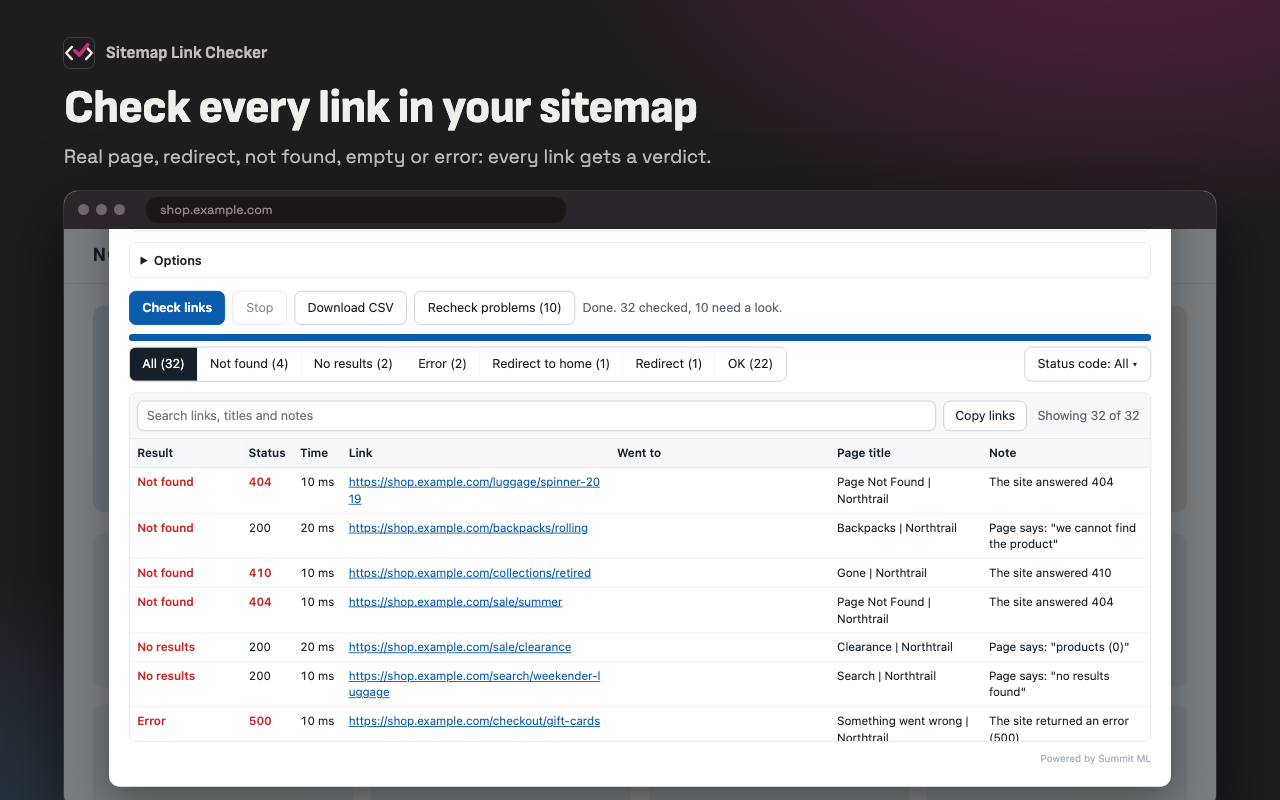
An XML sitemap promises that every page it lists exists. The tools that could check it are locked out of the sites where it matters, and fooled by the pages that are most broken.
The status code is what the server says. The page is what the visitor gets.
Why broken links in a sitemap go unnoticed
Before a launch or a site migration, someone should confirm that every URL in the sitemap lands on a real page. That job goes to a crawler or a broken link checker, and both get two things wrong.
It is not you. Staging sits behind a password, production behind bot protection, the account area behind a sign-in. A crawler is stopped at the door. Your browser is already through it.
It trusts the status code. Many sites answer 200 OK for a page that only says "we can't find that." Search engines call these soft 404s, and a tool that looks only for 404 errors never sees them. Here are four links from one run. A check that reads only the status would pass three of them.
| Link | Status | What the page shows | Verdict |
|---|---|---|---|
/luggage/spinner-2019 | 404 | The not-found page | Not found |
/backpacks/rolling | 200 | "We cannot find the product" | Not found |
/sale/clearance | 200 | A category with "products (0)" | No results |
/collections/summer | 200 | The home page, after a redirect | Redirect to home |
Sitemap Link Checker is a Chrome extension that runs the check inside your browser, on the site you are testing, and reads each page the way a visitor would. It is free, open source, and MIT licensed.
Check a sitemap for broken links
Add it from the Chrome Web Store. It also installs in Edge. Then:
- Open the site you want to test and click the Sitemap Link Checker button.
- Click Load sitemap. The checker finds
sitemap.xmlfrom the page or the site'srobots.txt. - If it is a sitemap index, tick the sitemap files to check and click Check links.
- Filter the results to the problems and click Download CSV.
You can also paste a list of URLs instead of loading a sitemap.
Every link gets a verdict, with its status code, response time, page title, and the reason.
| Result | Meaning |
|---|---|
| OK | The link opened a normal page. |
| Redirect | The link redirects to a different URL, which is shown. |
| Redirect to home | The link redirects to the home page. The page is usually gone. |
| Not found | A 404 or 410, or the site's not-found page under another status. |
| No results | A search or category page that lists nothing. |
| Error | The site returned an error, or the page shows one. |
| Blocked, Sign-in needed | The site refused the link. It is not counted as broken. |
| Warning | The page loaded but should not be in the sitemap: it is marked noindex, or its canonical URL points elsewhere. |
Filter by result, by status code, or by search. After a fix, Recheck problems checks only the links that were not OK.
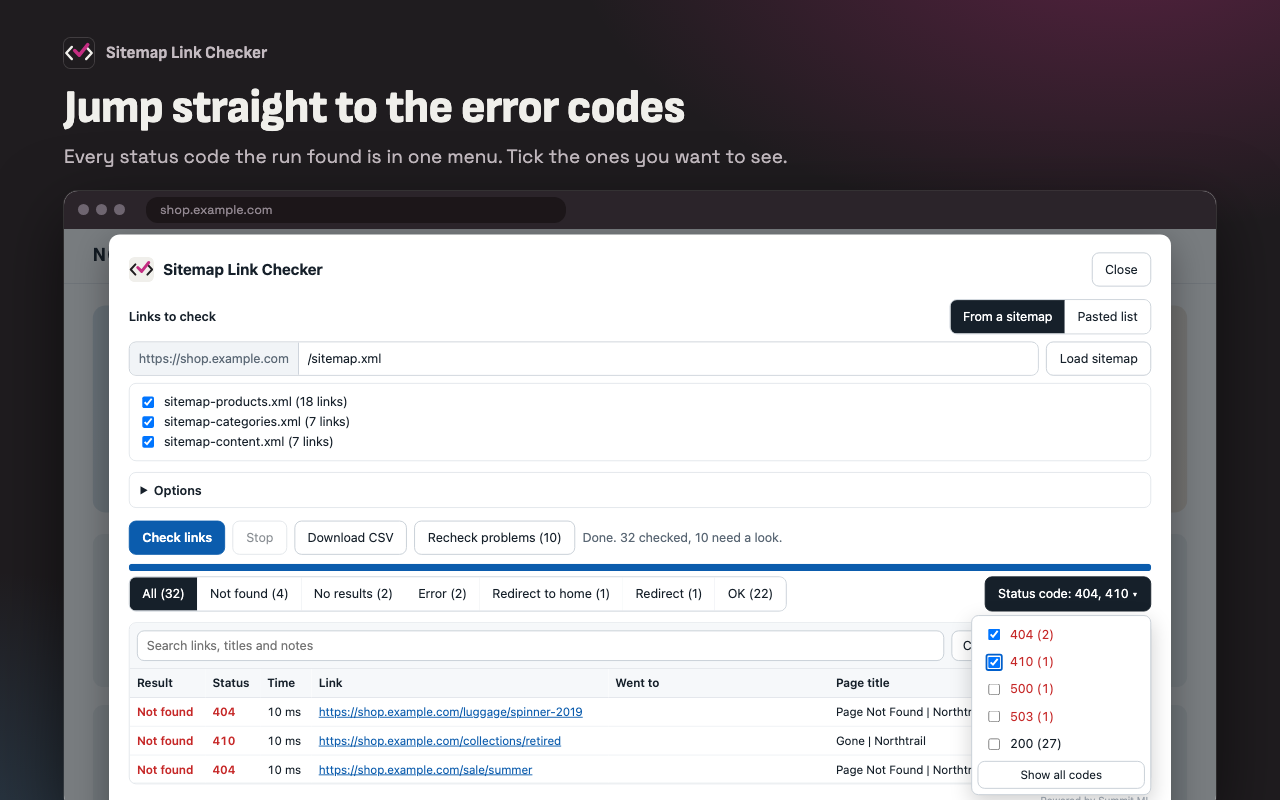
How it finds soft 404s
The first rule that matches wins.
- The status code. 404 and 410 are Not found. 500 and above are Errors.
- The words on the page. Phrases such as "we cannot find the product" or "products (0)" mark a page that answered
200 OKand is not really there. The list is under Options, and you can add your own site's wording. - The site's own not-found page. Before a run, the checker asks for an address that cannot exist and remembers what comes back. Any link that returns the same page is Not found.
- The title and heading. "404", "not found", or "something went wrong" in either one.
Sign-ins, passwords, and bot protection
The checker uses your browser's session. It never asks for a password and never stores one.
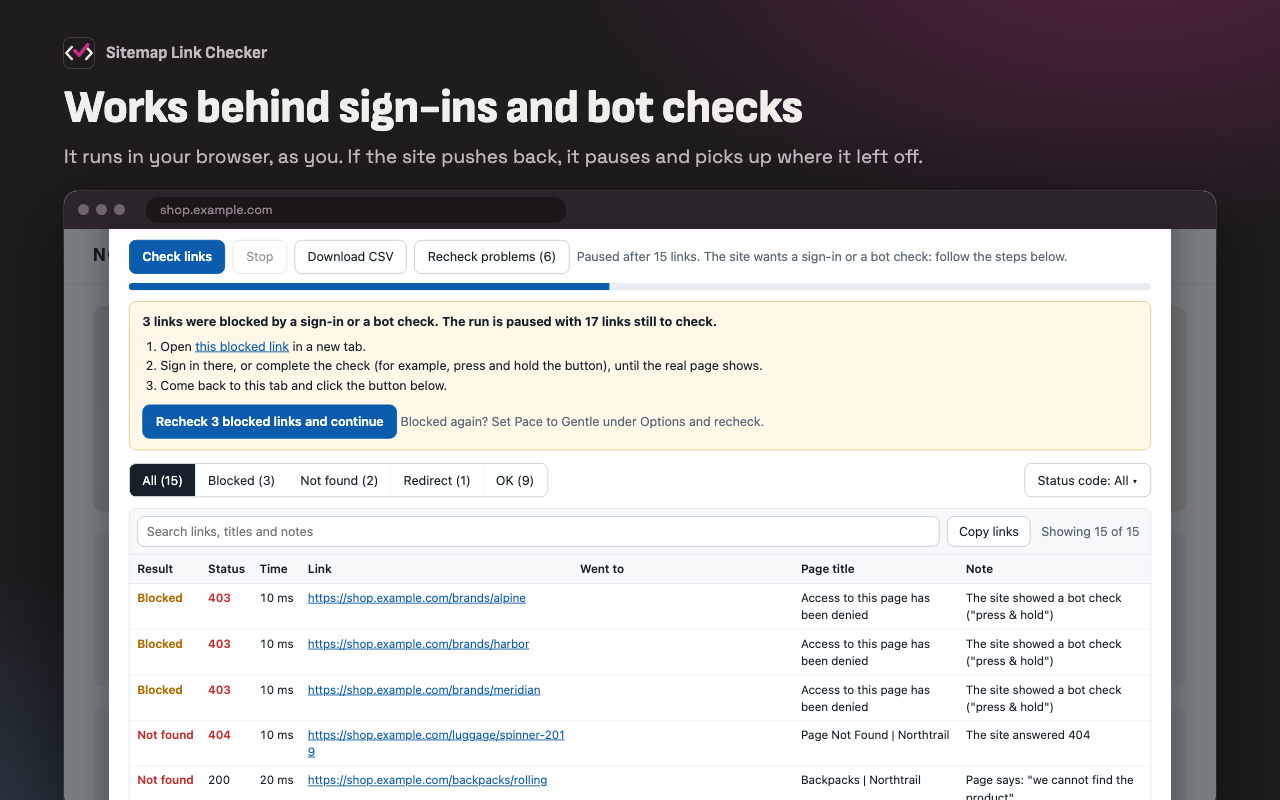
If the site starts refusing links partway through, they are reported as Blocked, not as broken. After three in a row the run pauses. Open a blocked link, pass the sign-in or bot check, and click Recheck. The run carries on from where it stopped.
Check a production sitemap on a staging site
A staging site often serves a sitemap whose links point at the live site. The checker offers to check them on the site you are on, at the same paths:
- Link in the sitemap:  https://www.example.com/luggage/carry-on
+ Link that is checked: https://staging.example.com/luggage/carry-on
This is the case it was built for: confirming, before a launch, that every page production promises exists on the build about to replace it.
Privacy and limits
Nothing is sent anywhere. There is no server and no analytics, and the extension can only see the tab you click its button on.
- One site at a time. It checks the site it is opened on.
- Pages are read as served. Content that only appears after scripts run is not seen.
- It is slower than a crawler. Three links at a time, which is also why the site keeps answering.
If the site is public, unprotected, and honest about its status codes, a command-line crawler is faster and can run in CI. Use that.
Key takeaways
- A sitemap collects broken links quietly, because the ordinary ways a page disappears do not produce a 404 error.
- A soft 404 answers
200 OK. The verdict has to come from the page, not the status code. - The sites that most need checking are behind passwords and bot protection. A check in your browser is already through.
- A blocked link is not a broken link.
Links
- Sitemap Link Checker on the Chrome Web Store
- Sitemap Link Checker on GitHub
- Privacy policy
- Summit ML open source projects
Changelog
- 0.1.0 (2026-11-19) — First draft.