A Stable Address for Every Dev Service
A dev server is usually known by a port number, and a port number is an accident of what started first. This module argues that every service in development deserves its own permanent, private name, shows what that changes for frontends, phones, teammates, and AI agents, and walks through how Routlet, our open source tool, provides one on a Tailscale network without touching the app.
- Updated
- Nov 18, 2026
- Version
- v0.1.1
- Read
- 11 min
- By
- Summit ML
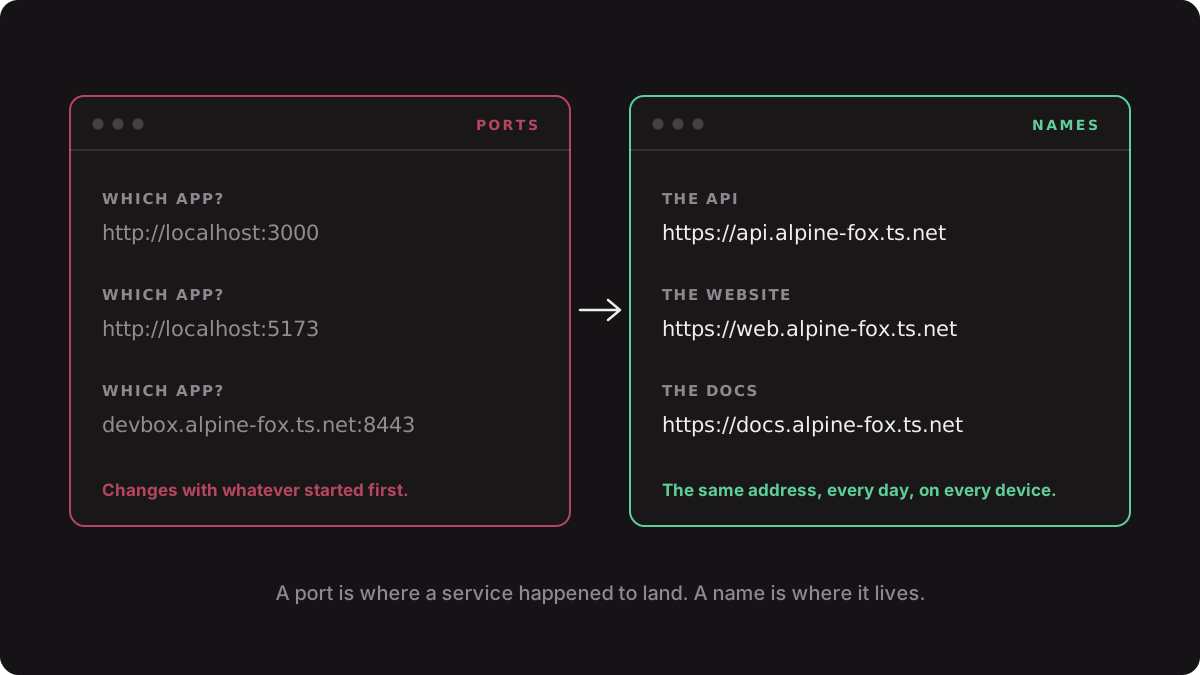
In production every service has a name. In development it has a port number that nobody chose. Most of the friction in local development follows from that difference.
A port is where a service happened to land. A name is where it lives.
Executive summary
Run three apps on one machine and you get three port numbers. Which app has which number depends on the order they started in, what else was running, and what each framework did when its preferred port was taken. Nothing else in the system knows those numbers, so they get copied by hand into environment files, browser tabs, chat messages, and agent prompts, and they go stale the next morning.
The fix is not a better way to remember ports. It is to stop using the port as the service's identity. Give each service one name, make that name resolve to the same HTTPS address every time from every device you own, and let something else worry about which port the app is on today.
We built Routlet to do that for ourselves and released it under the MIT license. One command starts the app, picks its port, and puts it behind a permanent address on your Tailscale network. The app needs no dependency, no config file, and no code change. This module makes the argument first and shows the tool second, because the argument holds whichever tool you use.
The addresses below use a made-up network name, alpine-fox. Yours will be different.
- http://localhost:5173                  # which app was that again?
- http://devbox.alpine-fox.ts.net:8443   # which app was that again?
+ https://api.alpine-fox.ts.net          # always the API
+ https://web.alpine-fox.ts.net          # always the website
The port is the wrong identity
A port number carries no meaning and no memory. That causes four separate problems, and they tend to get blamed on four different things.
Configuration that cannot be written down
A frontend needs the API's URL. If that URL contains a port that changes, the value cannot live in a committed file, so each person keeps a private copy and fixes it when it breaks.
On Monday the API starts on port 3000, and this file is right:
# .env.local
VITE_API_URL=http://localhost:3000
On Tuesday something else grabs port 3000 first, the API lands on 3001, and the frontend starts throwing errors that have nothing to do with the code. With a name, the file stays right:
# .env.local
VITE_API_URL=https://api.alpine-fox.ts.net
One hostname for everything
Browsers scope cookies to the hostname, not the port. Every app on localhost therefore shares one cookie jar.
| App | Address | Cookie the browser sends |
|---|---|---|
| Shop | http://localhost:3000 | session=abc |
| Admin | http://localhost:5173 | session=abc (the same one) |
Two apps that would never share a session in production share one on your laptop. Bugs appear that exist nowhere else, and bugs that do exist in production stay hidden. Give each service its own name and the isolation comes back:
| App | Address | Cookie the browser sends |
|---|---|---|
| Shop | https://shop.alpine-fox.ts.net | session=abc |
| Admin | https://admin.alpine-fox.ts.net | Nothing from Shop |
Nothing works from another device
localhost on a phone is the phone. Say you want to check a page on a real device:
- Without a name: find your computer's IP address, type
http://192.168.1.24:5173into the phone, and lose HTTPS, which some browser features require. - With a name: type
https://web.alpine-fox.ts.net. It opens, over HTTPS.
Agents cannot be told where things are
An AI agent working across services needs to know where each one lives. An address that might change is not an instruction.
An agent that guesses the port will sometimes test the wrong app and report success.
What a good dev address has
| Property | Why it matters | Example |
|---|---|---|
| Named per service | The address can be written into config once and committed | https://api.alpine-fox.ts.net |
| Stable across restarts | Tabs, bookmarks, scripts, and prompts keep working | Same address after a reboot |
| Its own hostname | Cookies and storage are isolated the way they are in production | api and web are separate hosts |
| HTTPS | Secure-context browser features behave as they will in production | https://, not http:// |
| Private | Reachable from your devices, not from the internet | Does not open from outside your network |
| No app changes | Any server, in any language, qualifies | routlet run --name api npm run dev |
| Honest when down | You always know which service you are talking to | A stopped service is unreachable |
The last row is easy to skip. A tool that quietly falls back to a different URL when the name is unavailable has recreated the original problem: the address no longer tells you which service you reached.
Where the usual options stop
| Option | What you get | Where it stops |
|---|---|---|
localhost | http://localhost:5173 | No name, no HTTPS, no other devices |
tailscale serve | https://devbox.alpine-fox.ts.net for the first app | The second app gets a port again, such as :8443 |
| A public tunnel | A public URL | Your dev server is on the internet |
| Routlet | https://api.alpine-fox.ts.net | A one-time setup |
tailscale serve, and tools built on it, publish apps under the machine's name. If one app per machine is all you need, that takes less setup than Routlet and is the better choice.
A public tunnel is the right tool for showing a client a preview and the wrong default for an API with test data behind it.
Using Routlet
Install
npm install -g @summitml/routlet
It runs on macOS and Linux and needs Node.js 24 or later.
Start a service
Put routlet run --name and a name in front of the command you already use.
routlet run --name api npm run dev
routlet: api is live at https://api.alpine-fox.ts.net (app port 51724)A few more:
# A Vite app
routlet run --name web vite dev

# An app in another directory
routlet run --name docs --cwd ../docs npm start

# An app with its own --port flag: put -- before the command
routlet run --name files -- serve --port 8080
What that command does
- Claims the name. A name belongs to the directory that first used it.
- Brings up the address. Routlet defines a Tailscale Service for the name and has a small background gateway on your machine serve it over HTTPS.
- Starts the app on a free port, passed to the app as
PORT. - Finds the port the app really used. Some apps ignore
PORT, so Routlet looks at what the app's process tree is listening on. - Points the address at the app and records the service.
The gateway proxies each request to the app on localhost, WebSockets included. One gateway serves every service on the machine, and it exits on its own about ten minutes after the last service stops.
Vite and Astro ignore PORT, so Routlet adds the flag for them:
You type:      routlet run --name web vite dev
Routlet runs:  vite dev --port 51731 --strictPort
See what is running
routlet list
NAME  STATUS   URL                              PORT
api   running  https://api.alpine-fox.ts.net    51724
docs  stopped  https://docs.alpine-fox.ts.net
web   running  https://web.alpine-fox.ts.net    51731
For one service in detail:
routlet inspect api
name          api
url           https://api.alpine-fox.ts.net
status        running
ingress       tailscale
tailnet       approved to serve
app port      51724
directory     /Users/sam/projects/api
command       npm run dev
And for just the address, which is what scripts and agents want:
routlet url api
https://api.alpine-fox.ts.netWire services together
Because addresses are predictable, one service can be handed another's URL through the environment variables it already reads. Write @ and the service name:
routlet run --name api npm run dev
routlet run --name web --env VITE_API_URL=@api npm run dev
The web app starts with:
VITE_API_URL=https://api.alpine-fox.ts.netThe referenced service does not need to have run yet. Every app also receives its own name and address:
ROUTLET_NAME=web
ROUTLET_URL=https://web.alpine-fox.ts.net
In a shared repository
Routlet can sit in the project's own scripts:
{
  "scripts": {
    "dev": "routlet run --name my-app vite dev"
  }
}
Everyone runs npm run dev. What they get depends on their machine:
| Machine | Result |
|---|---|
| Tailscale set up | https://my-app.alpine-fox.ts.net |
| No Tailscale | http://127.0.0.1:51800, on a port that stays the same |
On a machine without Tailscale, Routlet says so:
routlet: No Tailscale credential found, so this URL only works on this machine. Run "routlet setup" to see how to enable tailnet URLs.Contributors who do not use Tailscale are not blocked, and nobody maintains two scripts.
From Node.js
import { run } from '@summitml/routlet';

const api = await run({
  name: 'api',
  command: ['npm', 'run', 'dev'],
  cwd: '/path/to/api',
});

const web = await run({
  name: 'web',
  command: ['npm', 'run', 'dev'],
  cwd: '/path/to/web',
  urlEnv: { VITE_API_URL: 'api' },
});

console.log(web.url);
await web.stop();
Stop and remove
routlet stop api    # stop the app; the name stays reserved
routlet rm api      # forget the service and free the name
When things go wrong
Routlet never hands you a different address. It stops and says why.
| Situation | What you see |
|---|---|
| The name is already running | "api" is already running. |
| Another directory owns the name | The name "api" belongs to /Users/sam/projects/old-api. Choose another name, or use replace to take it over. |
| A device on the network has the name | The name "api" is already a device on your tailnet (api.alpine-fox.ts.net). Choose another name. |
| The app dies before it is ready | The app exited before it started listening (exit code 1). |
If the gateway crashes or restarts, Routlet reopens the address behind the app, which keeps running throughout. That typically takes about fifteen seconds, and in the meantime the state is visible instead of guessed:
NAME  STATUS                URL                            PORT
api   running, URL offline  https://api.alpine-fox.ts.net  51724
Every two minutes Routlet also checks that Tailscale still allows this machine to serve the name, and restores that approval if it was withdrawn.
The one-time setup
This happens once, in the Tailscale admin console. The README has the full steps.
- Enable HTTPS certificates.
- Add the tag
tag:routletto the policy file. - Create an OAuth client with write access limited to that tag.
- Run
routlet authand paste the client's secret.
The secret goes into your system keychain, not into a file. Then check your work:
routlet setup
When everything is in place:
✓ Tailscale on this machine: Connected to alpine-fox.ts.net
✓ HTTPS certificates: Enabled
✓ OAuth client secret: Stored in the system keychain
✓ Access to devices: Can read devices
✓ Auth keys for tag:routlet: Can create tagged auth keys
✓ Access to services: Can define and delete services

Ready for tailnet URLs.
When something is missing, it tells you where to fix it:
✓ Tailscale on this machine: Connected to alpine-fox.ts.net
✗ HTTPS certificates: Enable HTTPS certificates at https://login.tailscale.com/admin/dns

1 thing to fix. Until then, routlet run gives local URLs only.
What it costs
Routlet is a small tool with real limits, and they are worth knowing before you adopt it.
- It is pre-release and Tailscale only. The process, port, proxy, and registry layers have automated tests. The Tailscale path has been checked by hand on a real tailnet and has no automated tests yet.
- The address format is fixed. You choose the first label: in
https://api.alpine-fox.ts.net, that isapi. The rest is your tailnet's name, and custom domains are not supported. - Names are public even though services are not. Each service gets its own certificate, and certificate hostnames appear in public transparency logs. Call it
api, notacme-merger-api. - A new name is slow once. The first start can take up to a minute while the certificate is issued. Later starts take a couple of seconds.
- Service counts are limited by your Tailscale plan.
- One name, one port. In a monorepo, put
routlet runin each app's own dev script instead of around the task runner.
Applying the idea without the tool
The principle does not depend on Routlet. List the services you run in development and ask one question of each:
Could I write this address in a committed file and have it be correct on a teammate's machine next month?
| Service | Address today | Answer | What to do |
|---|---|---|---|
| API | http://localhost:3000 | No | Give it a name |
| Website | http://localhost:5173 | No | Give it a name |
| Mail preview | https://mail.alpine-fox.ts.net | Yes | Nothing |
Wherever the answer is no, a port number is standing in for a name, and the workarounds around it are costing more than they appear to.
Key takeaways
- A port number is an accident of start order. Using it as a service's identity is the root of most local development friction.
- A good dev address is named, stable, private, served over HTTPS, isolated on its own hostname, and honest about being down.
- Publishing apps under the machine's name solves the first app and brings ports back for the rest.
- Routlet gives each service its own permanent address on a Tailscale network by wrapping the app's normal start command. The app is not changed.
- Stable names matter more as AI agents do more of the work, because an agent can only be told where a service lives if the answer stays true.
Links
Changelog
- 0.1.1 (2026-11-18) — Edited.
- 0.1.0 (2026-12-03) — First draft.