Review Comments That Live on the Page
Website feedback usually arrives as screenshots, red circles, and descriptions of where something is. The location is the first thing lost. This module argues that review notes belong on the page itself, pinned to the element they are about and private to the people reviewing, and shows how CommentLayer, our open source tool, does it as an extension, an embed, or a backend you host.
- Updated
- Nov 12, 2026
- Version
- v0.1.0
- Read
- 8 min
- By
- Summit ML
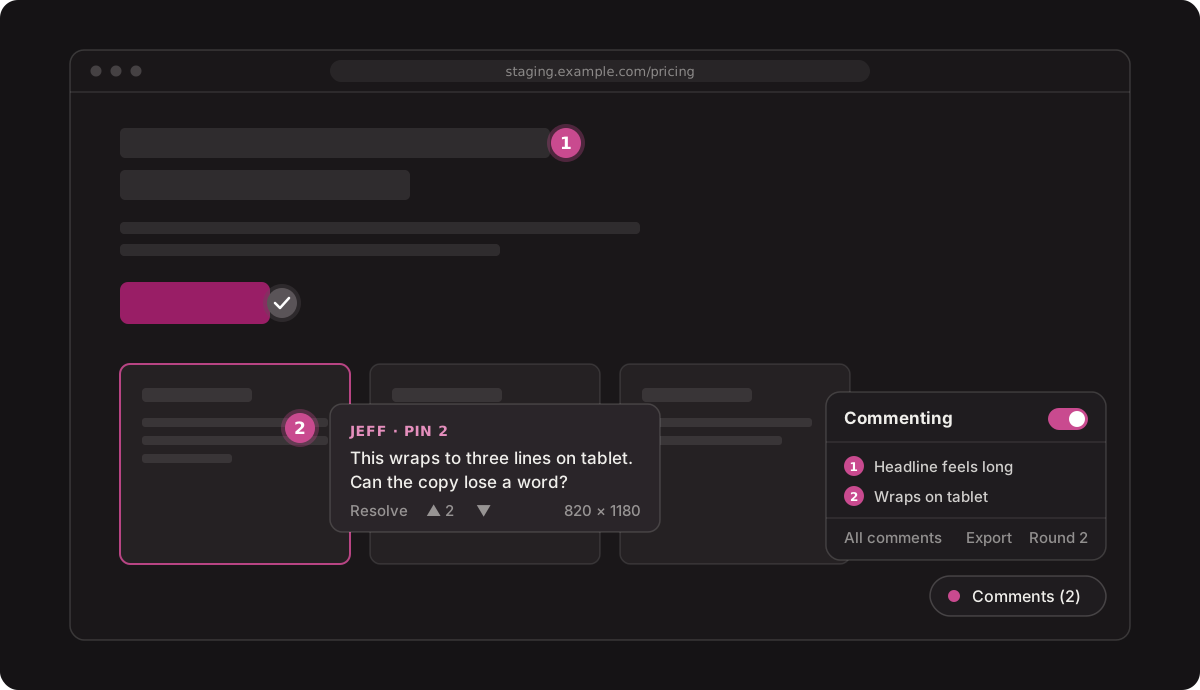
Most review feedback is two things: what is wrong, and where. Screenshots and chat threads keep the first and lose the second.
A note that is pinned to the thing it describes does not need to describe where it is.
Executive summary
A site goes out for review and the feedback comes back in every shape except a useful one: screenshots with red circles, a long email, a chat thread, a spreadsheet with a "location" column. Someone then spends an hour working out which button "the second card under the hero, on mobile" refers to, and whether two of the notes are about the same thing.
The fix is to put the note where the problem is. Turn commenting on, click the element, say what should change. Everyone else sees a numbered pin in that spot, and a drawer lists every note across the site.
CommentLayer is the tool we built for this, to review our own site before launch. It is MIT licensed, needs no accounts, and never posts anything to the site being reviewed. This module covers why location is the hard part of feedback, what a good review note records, and how to run CommentLayer three different ways.
Where feedback loses its place
The same note, three ways:
The first version costs the reader three questions before any work starts: which page, which card, how wide was the screen. The second answers all three without the reviewer typing any of it.
| Feedback channel | What it keeps | What it loses |
|---|---|---|
| Screenshot with a circle | How it looked | The page, the element, the screen size |
| Chat thread | The conversation | Which note is about what, and what is still open |
| Spreadsheet | A list you can sort | Everything visual |
| A pin on the page | The element, the page, the screen size, the thread | Nothing you need |
What a good review note records
A note is only as useful as what comes with it. CommentLayer records these with every pin, so the reviewer does not have to:
| Recorded | Example | Why it matters |
|---|---|---|
| The page | /pricing | No "which page was this?" |
| The element | A CSS path to the clicked element | The pin follows the element, not a pixel |
| The point inside it | 62% across, 40% down | The pin lands on the right part of a large element |
| A label | The element's tag and up to 120 characters of its text | Readable in an export without opening the site |
| The screen size | 820 × 1180 | Tells you it was a tablet |
Pins are anchored to the element, not to a position on the screen. When the layout shifts, the pin moves with the thing it is about.
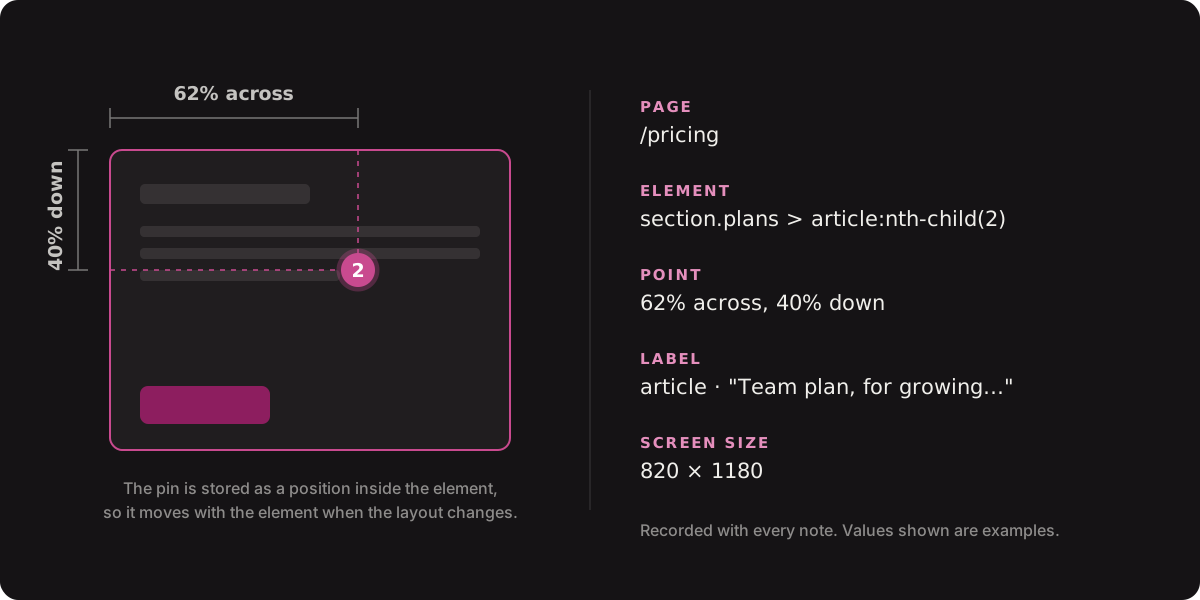
All of this is in the JSON and CSV exports. There is also "Copy for AI" in the Export menu, which writes the current round as markdown with those details on every note. An AI assistant, or a ticket, can then find each pin without a screenshot.
Private by default
Review notes are work in progress, and they are often blunt. Nothing about them should be public.
- Notes are seen only by the people you invite. Nothing is posted to the site being reviewed.
- Reviewers type a name once. There are no accounts to create.
- On hosted layers, access is the invite link itself, the way a shared design file link works.
- A hosted layer is deleted 30 days after its last change, and you can export or delete it sooner.
- If you would rather not use our backend at all, you can run your own.
Three ways to run it
| Way | Best for | What you set up |
|---|---|---|
| Browser extension | Reviewing any site, including ones you do not control | Install it, name a layer, share the invite |
| Embed | Your own staging or preview site | Two tags and one API route |
| Your own backend | Teams that want the data in their own account | Three commands on Cloudflare |
1. The browser extension
Install CommentLayer from the Chrome Web Store, open its options, type a name, and click "Create layer". There is no sign-in.
Then, on any site:
- Click the toolbar icon to turn the layer on for that site.
- Turn commenting on from the pill in the bottom-right corner.
- Click anything on the page to drop a numbered pin and leave a note.
- Click "Copy invite" and send the link to your team.
A teammate who opens the invite gets a join page. With the extension installed, one click adds the layer. Their pins appear on your screen within about twenty seconds, without a reload. Until you click the toolbar icon on a site, the extension adds nothing to that page and sends nothing.
2. Embed it on your own site
Install the package:
npm install commentlayer
Add the overlay to the page:
<link rel="stylesheet" href="/commentlayer/commentlayer.css">
<script src="/commentlayer/commentlayer.js" data-api="/api/commentlayer" defer></script>
And mount the API. The handler takes a standard Request and returns a Response, so it fits a Next.js route handler, Hono, Bun, or Deno:
import { createCommentStore, createHandler, filePersistence } from "commentlayer";

const store = createCommentStore({
  persistence: filePersistence(process.env.COMMENTLAYER_DATA_DIR ?? "./data"),
  adminToken: process.env.COMMENTLAYER_ADMIN_TOKEN,
});

export const handle = createHandler(() => store, { base: "/api/commentlayer" });
Keep it off production. An embed has no invite link: anyone who can open the page can read every note and add their own. Use a switch that is off unless you turn it on. A dev-or-production check is the wrong switch, because staging and preview builds usually run as production builds.
// Set COMMENTLAYER=on on the preview or staging deployment only.
const enabled = process.env.COMMENTLAYER === "on";

export const handle = enabled
  ? createHandler(() => store, { base: "/api/commentlayer" })
  : () => new Response(null, { status: 404 });
As a second guard, list the hostnames the overlay may run on. Anywhere else the script does nothing, even if the tag ships by mistake:
<script src="/commentlayer/commentlayer.js" data-api="/api/commentlayer"
        data-hosts="staging.example.com, *.preview.example.com, localhost" defer></script>
This is how we run it ourselves: [on] on our staging site, absent from production.
3. Host the backend yourself
The repository includes a Cloudflare Worker that runs on the free tier and serves the overlay files as well.
cd worker
npx wrangler kv namespace create COMMENTS
npx wrangler secret put ADMIN_TOKEN
npx wrangler deploy
Point the extension at it under "Advanced" in the options, or use it as the data-api for an embed. Notes on that layer go to your backend and never reach ours.
Storage is a small interface, so you can also keep notes wherever you already keep things:
const persistence: Persistence = {
  load: async () => JSON.parse(await readSomewhere()) ?? null,
  save: async (data) => writeSomewhere(JSON.stringify(data)),
};
Running a review
Rounds
Comments are grouped into review rounds. An admin starts a new round when a new build goes up, and older rounds stay viewable read-only. A typical project:
| Round | When | What happens to it |
|---|---|---|
| Round 1: first build | Client's first look | Notes resolved as fixes ship |
| Round 2: revisions | After the fixes | Only what is still wrong |
| Round 3: pre-launch | Final check | Should be short |
Who can do what
| Action | Any reviewer | The note's author | Admin |
|---|---|---|---|
| Leave a note | Yes | Yes | Yes |
| Resolve a note, vote it up or down | Yes | Yes | Yes |
| Edit or delete a note | No | Yes | Yes |
| Start or rename a round | No | No | Yes |
Make it match the site
Three colors drive the whole overlay. Pass them on the script tag:
<script src="/commentlayer/commentlayer.js" data-api="/api/commentlayer"
        data-primary="#c94a8f" data-secondary="#1f1c1f" data-tertiary="#f0efeb" defer></script>
If you pass nothing, the overlay looks for the site's own color variables, such as --primary or --brand, and uses those. Text colors are picked for contrast automatically.
What it is not
- Not a project tracker. There are no assignees or due dates. Export the round and put the work where your team tracks work.
- Not built for huge volumes. The store writes the whole set on every change. That is right for a review and wrong for a product with thousands of users.
- Not permanent storage. Hosted layers clear out 30 days after the last change. Export what you want to keep.
- Early. It is version 0.1. The store, handler, and Worker routes have automated tests; the overlay itself does not yet.
Applying the idea without the tool
Whatever you use for review, ask of each note:
Could someone who was not in the room find the exact element this is about, at the screen size it was seen on, without asking?
If not, the note is missing its location, and somebody will pay for that later. Capture the page, the element, and the screen size at the moment the note is written, because that is the only moment it is free.
Key takeaways
- Feedback has two parts, what and where. Most channels keep the first and lose the second.
- A pin on the element records the page, the element, the point, and the screen size without the reviewer typing them.
- Review notes should be private to the reviewers. CommentLayer posts nothing publicly and needs no accounts.
- Run it as a browser extension, an embed on staging, or a backend in your own Cloudflare account.
- Keep an embed off production with a switch that is off by default, and a hostname list as a second guard.
- Structured notes are also what an AI assistant needs to act on feedback. "Copy for AI" hands them over as markdown.
Links
- CommentLayer on GitHub
- CommentLayer on npm
- CommentLayer on the Chrome Web Store
- Summit ML open source projects
Changelog
- 0.1.0 (2026-11-12) — First draft.